> ## Documentation Index
> Fetch the complete documentation index at: https://docs.halliday.xyz/llms.txt
> Use this file to discover all available pages before exploring further.
# Halliday JS SDK Widget Documentation
The Halliday JS SDK widget allows users to perform onramps, swaps, and exchange withdrawals to or from any chain or token with minimal integration effort.
It provides the most rapid integration of Halliday with a feature-rich configuration.
To use the Halliday JS SDK, first get a free API key at [dashboard.halliday.xyz](https://dashboard.halliday.xyz/).
## Installation
Install the SDK, which is available on NPM.
```shell theme={null}
npm install @halliday-sdk/payments
```
```shell theme={null}
yarn add @halliday-sdk/payments
```
## Initialization
Next the SDK can be imported into a front-end TypeScript or JavaScript project.
```tsx copy theme={null}
import { useHallidayPayments } from "@halliday-sdk/payments/react"
```
```tsx copy theme={null}
import HallidayPayments from "@halliday-sdk/payments"
```
This is an example configuration for initializing the SDK. More information on each parameter, and whether or not it is required, is detailed in the next section.
Initializing the widget on page load or component mount will set up the widget in the background before the user clicks a deposit or withdraw button.
Presenting the widget in a click event handler is shown in the [deposits section](/pages/sdk-deposits).
```tsx copy theme={null}
createRoot(document.getElementById("root")).render(
);
```
```tsx copy theme={null}
import HallidayPayments from "@halliday-sdk/payments"
import { connectWalletClient } from "@halliday-sdk/payments/viem";
import { createWalletClient, custom } from "viem";
import { base } from "viem/chains";
const [ address ] = await window.ethereum.request({ method: "eth_requestAccounts" });
const owner = connectWalletClient(() =>
createWalletClient({
chain: base,
transport: custom(window.ethereum),
}),
);
const halliday = new HallidayPayments({
apiKey: HALLIDAY_PUBLIC_API_KEY,
owner,
deposit: {
// USDC on Base
outputs: [ "base:0x833589fcd6edb6e08f4c7c32d4f71b54bda02913" ],
funders: [],
destinationAddress: address,
},
});
// More or updated config parameters can be passed later
// using `updateConfig` e.g. add another wallet connection
halliday.updateConfig({});
```
## Options
The `HallidayPayments` constructor initializes the Halliday JS SDK instance and prepares the widget interface to subsequently be opened and displayed to the user.
To open the SDK widget interface, like in a deposit button click event handler, use the `openDeposit` function. More on the deposit button pattern in the [SDK Deposits](/pages/sdk-deposits) section.
More on [config and wallet updates](#config-and-wallet-updates) below.
Both the constructor and `updateConfig` functions accept all of the following configuration options.
| Name | Type | Description |
| :--------------------------- | :--------------------------------------- | :--------------------------------------------------------------------------------------------------------------------------------------------------------------------------------------------------------------------------------------------- |
| `apiKey` | string | The public API key for authorization. The only required parameter. |
| `owner` (optional) | Owner | The end user / recipient identity. One of three variants: `direct`, `wallet-auth`, or `otp-auth`. See [Owner](#owner). |
| `onConnectWallet` (optional) | () => void | Callback invoked when the widget asks the host to connect a wallet. Can be replaced live via `updateConfig`. |
| `deposit` (optional) | object ([DepositConfig](#deposit)) | Deposit/onramp configuration group. |
| `withdrawal` (optional) | object ([WithdrawalConfig](#withdrawal)) | Withdrawal/offramp configuration group. `withdrawal.funder` must be set before calling `openWithdrawal()`. |
| `customStyles` (optional) | object ([CustomStyles](#customstyles)) | Custom styles for the widget. |
| `fontName` (optional) | string | Font family name used inside the widget. Options are "haffer", "inter", "eb-garamond", "roboto-mono" |
| `headerTitle` (optional) | string | Custom title for the widget header. |
| `targetElementId` (optional) | string | The ID of the DOM element where the widget should be embedded. When set, the widget renders in EMBED mode; when absent, it renders as a full-screen MODAL. In React, use the [``](#embedding-the-sdk-widget) component instead. |
## Owner
The `owner` is a self-custody wallet that controls the user's payment onchain. In the event a payment [becomes stuck](/pages/api-error-recovery-withdrawal), the user can generate an EVM signature to withdraw the assets or route them to a recovery payment.
In addition to EOA users, owner configuration options are available below for users that either do not have a wallet at all or have a non-EVM compatible wallet.
### Owner - EOA
This type of direct owner configuration is best for users that connect their own EOA wallet to the page like MetaMask, Rabby, Phantom, et al.
```js theme={null}
const owner = {
getAddress: async () => "0x...", // required, async
signMessage: async ({ message }) => "...", // required
signTypedData: async ({ typedData }) => "...", // required
sendTransaction: async (tx, chain) => TransactionReceipt, // Optional
walletName: "Bob's Account", // Optional, shown in the wallet selector
};
```
This object can be constructed from scratch or created using the Halliday SDK's [wallet connector functions](#using-the-wallet-connector).
For examples with popular SDKs and embedded wallet providers, see the [using a connected wallet](#using-a-connected-wallet) section below.
| Name | Type | Description |
| :--------------------------- | :--------------------- | :----------------------------------------- |
| `getAddress` | () => Promise\ | Returns the owner's wallet address. |
| `signMessage` | SignMessage | Signs a plain message. |
| `signTypedData` | SignTypedData | Signs EIP-712 typed data. |
| `sendTransaction` (optional) | SendTransaction | Sends a transaction from the owner wallet. |
| `walletName` (optional) | string | Display name shown in the widget. |
### Owner - Wallet Auth
The user authenticates by providing an EVM signature confirming ownership of payments with their EVM wallet address. This is commonly used for owning payments that are initialized on non-EVM chains.
If the user does not have an EVM wallet, an embedded wallet can be used with an emailed one-time passcode, which is detailed in the next section.
| Name | Type | Description |
| :---------------- | :---------------------------- | :------------------------------------------ |
| `type` | `"wallet-auth"` | Variant discriminator. |
| `walletType` | `"EVM"` \| `"SOL"` \| `"SUI"` | Chain family of the owner wallet. |
| `address` | string | The owner's wallet address. |
| `signAuthMessage` | SignAuthMessage | Signs the authentication challenge message. |
### Owner - OTP Auth
Email one-time passcode authentication. The auto-generated embedded EVM wallet is the owner of payments. This method is a proper option if the user does not have a wallet or connects a non-EVM compatible wallet.
| Name | Type | Description |
| :-------- | :----------- | :------------------------ |
| `type` | `"otp-auth"` | Variant discriminator. |
| `address` | string | The user's email address. |
## Deposit
The following are configuration options for onramps or cross-chain deposits of assets to a specified destination address e.g. the user's wallet or an in-app smart contract wallet.
| Name | Type | Description |
| :------------------- | :--------------------------- | :--------------------------------------------------------------------------------------------------------------------------------------------------------------------------- |
| `inputs` (optional) | Asset\[] | Source/funding assets. Asset strings use the format `"chain:tokenAddress"`. See [payment methods](/pages/payment-method-support#supported-tokens) for all asset identifiers. |
| `outputs` | Asset\[] | Assets the user receives in the `destinationAddress`. |
| `funders` (optional) | [FunderRole](#funderrole)\[] | Funding wallets available to the user at payment time. |
| `destinationAddress` | string | The address where deposited funds are sent. |
## Withdrawal
The following are configuration options for the withdraw widget.
This is used for withdrawing assets from the user's wallet or an in-app smart contract wallet to another address.
| Name | Type | Description |
| :------------------------------ | :------------------------ | :-------------------------------------------------------------------------------------------------------------------------- |
| `inputs` (optional) | Asset\[] | Assets that can be withdrawn. Defaults to `deposit.outputs` minus fiat assets at open time. Pass `[]` to accept all assets. |
| `outputs` (optional) | Asset\[] | Filter on allowed withdrawal targets. |
| `funder` | [FunderRole](#funderrole) | The wallet funding the withdrawal. Required — `openWithdrawal()` throws if it is not set. |
| `destinationAddress` (optional) | string | The offramp target address. This can be on another chain than the origin address. |
## FunderRole
Configuration options for each funding wallet with transaction capability.
| Name | Type | Description |
| :---------------------- | :--------------------- | :------------------------------------------ |
| `getAddress` | () => Promise\ | Returns the funder's wallet address. |
| `sendTransaction` | SendTransaction | Sends a transaction from the funder wallet. |
| `walletName` (optional) | string | Display name shown in the widget. |
## CustomStyles
All fields are optional. Colors are CSS color strings.
| Name | Type | Description |
| :------------------------------ | :------------------------ | :-------------------------------------------------------------------------------------------------------------------------- |
| `primaryColor` (optional) | string | Primary accent color. |
| `backgroundColor` (optional) | string | Widget background color. |
| `borderColor` (optional) | string | Border color. |
| `textColor` (optional) | string | Primary text color. |
| `textSecondaryColor` (optional) | string | Secondary text color. |
| `accentColor` (optional) | string | Accent color. |
| `successColor` (optional) | string | Color used for success states. |
| `alertColor` (optional) | string | Color used for alerts/errors. |
| `borderStyle` (optional) | `"SQUARE"` \| `"DEFAULT"` | Corner style of widget components. |
| `backgroundStyle` (optional) | `"BLUR"` \| `"OFF"` | Modal backdrop style. |
| `componentShadow` (optional) | string | CSS box-shadow string applied to widget components. |
| `zIndex` (optional) | number | Stacking level of the widget interface when it is in modal mode. No default. Raise it above all other elements on the page. |
## Type Definitions
```ts theme={null}
type Address = string;
type Hex = `0x${string}`;
type TransactionRequest = {
to: Hex;
chainId: number;
from?: Hex;
nonce?: number;
gasLimit?: bigint;
gasPrice?: bigint;
maxPriorityFeePerGas?: bigint;
maxFeePerGas?: bigint;
data?: string;
value?: bigint;
};
interface TransactionReceipt {
transactionHash?: string;
blockHash?: string;
blockNumber?: number;
from?: string;
to?: string;
// Preserves the original receipt from ethers or viem
rawReceipt: any;
}
interface EVMChainConfig {
chain_id: bigint;
network: string;
explorer?: string;
image?: string;
is_testnet: boolean;
address_family: "EVM";
native_currency: {
name: string;
symbol: string;
decimals: number;
};
rpc?: string;
}
interface CustomStyles {
primaryColor?: string;
backgroundColor?: string;
borderColor?: string;
textColor?: string;
textSecondaryColor?: string;
accentColor?: string;
componentShadow?: string;
borderStyle?: "SQUARE" | "DEFAULT";
backgroundStyle?: "OFF" | "BLUR";
successColor?: string;
alertColor?: string;
zIndex?: number;
}
type FontName = "haffer" | "inter" | "eb-garamond" | "roboto-mono";
type HeaderTitle = string;
type Asset = string; // Format: "chain:tokenAddress"
type SignMessage = (input: { message: string; ownerAddress?: Address }) => Promise;
type SignTypedData = (input: { typedData: TypedData; ownerAddress?: Address }) => Promise;
type SendTransaction = (
transaction: TransactionRequest,
chainConfig: EVMChainConfig,
) => Promise;
type WalletAuthChain = "EVM" | "SOL" | "SUI";
type SignAuthMessage = (input: {
message: string;
address: Address;
walletType: WalletAuthChain;
}) => Promise;
type TransactionReceipt = {
transactionHash?: string;
blockHash?: string;
blockNumber?: number;
from?: Hex;
to?: Hex;
/** Whatever your provider returned, unmodified. */
rawReceipt?: unknown;
};
type EVMChainConfig = {
chain_id: bigint;
network: string;
is_testnet: boolean;
address_family: "EVM";
native_currency: { name: string; symbol: string; decimals: number };
explorer?: string;
image?: string;
rpc?: string;
};
type SendTransaction = (
transaction: TransactionRequest,
chainConfig: EVMChainConfig,
) => Promise;
type SolTransactionRequest = {
from: string;
/** Base64/base58 serialized transaction — sign and submit as-is. */
serializedTransaction: string;
};
type SolTransactionReceipt = {
signature: string;
};
type SolChainConfig = {
chain_id: bigint;
network: string;
is_testnet: boolean;
address_family: "SOL";
explorer?: string;
image?: string;
};
type SolSendTransaction = (
transaction: SolTransactionRequest,
chainConfig: SolChainConfig,
) => Promise;
type EvmFunderRole = {
getAddress: () => Promise;
sendTransaction: SendTransaction;
walletType?: "EVM";
walletName?: string;
};
type SolFunderRole = {
walletType: "SOL";
getAddress: () => Promise;
sendTransaction: SolSendTransaction;
walletName?: string;
};
interface ITransferInDepositInfo {
deposit_token: Asset;
deposit_amount: Number;
deposit_address: Address;
deposit_chain: string;
}
interface ITransferInInstruction {
type: "TRANSFER_IN";
payment_id: string;
funding_page_url?: string;
deposit_info: ITransferInDepositInfo[];
}
type GetBalances = () => Promise<[Asset, Number][]>;
type SendFunds = (instruction: ITransferInInstruction) => Promise;
type CustomFunderRole = {
walletName?: string;
getBalances: GetBalances;
sendFunds: SendFunds;
};
type FunderRole = EvmFunderRole | SolFunderRole | CustomFunderRole;
type Owner =
| {
type?: "direct";
getAddress: () => Promise;
signMessage: SignMessage;
signTypedData: SignTypedData;
sendTransaction?: SendTransaction;
walletName?: string; // e.g. MetaMask
}
| {
type: "wallet-auth";
walletType: WalletAuthChain;
address: Address;
signAuthMessage: SignAuthMessage;
}
| {
type: "otp-auth";
address: string; // email address
};
interface DepositConfig {
inputs?: Asset[];
outputs?: Asset[];
funders?: FunderRole[];
destinationAddress?: Address;
}
interface WithdrawalConfig {
inputs?: Asset[];
outputs?: Asset[];
funder?: FunderRole;
destinationAddress?: Address;
}
interface HallidayPaymentsConfig {
apiKey: string;
owner?: Owner;
onConnectWallet?: () => void;
deposit?: DepositConfig;
withdrawal?: WithdrawalConfig;
customStyles?: CustomStyles;
fontName?: FontName;
headerTitle?: HeaderTitle;
targetElementId?: string;
}
interface DepositSession {
input?: {
asset: Asset;
amount?: string;
};
output?: Asset;
inputFiatValue?: {
currency: string;
amount: string;
};
fundingAddress?: string;
destination?: string;
locked?: boolean;
}
interface WithdrawSession {
input?: {
asset: Asset;
amount?: string;
};
output?: Asset;
inputFiatValue?: {
currency: string;
amount: string;
};
destination?: string;
locked?: boolean;
}
type OrderStatus = any;
interface OrderNotification {
paymentId: string;
issue: string;
message: string;
}
type HallidayEvent = "status" | "error" | "close";
type HallidayErrorSource = "preload" | "openDeposit" | "openWithdrawal" | "resolution" | "load";
type HallidayRuntimeError = Error & { source: HallidayErrorSource };
type HallidayEventHandler = E extends "status"
? (s: { type: string; payload: OrderStatus }) => void
: E extends "error"
? (e: HallidayRuntimeError) => void
: () => void;
interface HallidaySnapshot {
isReady: boolean;
isOpen: boolean;
status: { type: string; payload: OrderStatus } | null;
error: HallidayRuntimeError | null;
notifications: OrderNotification[];
}
```
## Usage Patterns
### Config and Wallet Updates
After initialization, the instance's `updateConfig` function can be used to pass more parameters or overwrite previously passed parameters.
The React SDK has conventional React state management functions, so `updateConfig` should not be used. Properties should be used to update config settings on the `HallidayPaymentsProvider`.
For wallet changes, the React SDK has the `updateWallets` function returned by the `useHallidayPayments` hook.
```tsx copy theme={null}
// Action for use in useEffect block
updateWallets({
owner: { type: "...", address: "..." },
deposit: {
funders: [{ getAddress, sendTransaction, walletName: "MetaMask" }],
destinationAddress: "0xDest...",
},
withdrawal: {
funder: { getAddress, sendTransaction },
destinationAddress: "0xDest...",
},
});
```
```tsx copy theme={null}
halliday.updateConfig({
// ...
owner: {
getAddress: async () => "0x...",
signMessage: async ({ message }) => "...",
signTypedData: async ({ typedData }) => "...",
sendTransaction: async (tx, chain) => TransactionReceipt,
walletName: "Bob's Account", // Optional, shown in the wallet selector
},
// ...
});
```
### Ready & event handlers
The Halliday instance monitors events that an event handler can be registered for.
```tsx copy theme={null}
import { useEffect } from "react";
import { useHallidayPayments } from "@halliday-sdk/payments/react";
function HallidayEventLogger() {
const { instance } = useHallidayPayments();
useEffect(() => {
const offStatus = instance.on("status", (s) => console.log(`status: ${s.type}`));
const offError = instance.on("error", (e) =>
console.log(`error (${e.source}): ${e.message}`)
);
const offClose = instance.on("close", () => console.log("widget closed"));
return () => {
offStatus();
offError();
offClose();
};
}, [instance]);
return null;
}
```
```tsx copy theme={null}
const halliday = new HallidayPayments({/* ... */});
halliday.on("status", (s) => console.log(`status: ${s.type}`));
halliday.on("error", (e) => {
console.log(`error (${e.source}): ${e.message}`);
});
halliday.on("close", () => console.log("widget closed"));
```
There is a promise returned by the `ready` function. The promise resolves with no value once the initialization of the Halliday widget is completed. If there is an error in initialization a `WidgetLoadError` will be passed to the rejection.
```js theme={null}
await halliday.ready();
```
#### iframe postMessage events
The Halliday SDK's iframe will pass messages through the `window.postMessage()` function.
Integrations of the Halliday widget do not require monitoring of these events.
The following example illustrates logging of these events for debugging purposes.
```js theme={null}
window.addEventListener("message", (event) => {
if (event.origin !== "https://app.halliday.xyz") return;
const { type, payload } = event.data || {};
console.log("Halliday iframe message", type, payload);
});
```
### Using the wallet connector
Halliday can prompt users to choose a wallet to connect to the app. The wallet connector provides many options including MetaMask, Coinbase Wallet, Rainbow, or Wallet Connect.
Clicking the button will trigger the connect-wallet prompt. If the application already prompts the user to connect a wallet, see [using a connected wallet](#using-a-connected-wallet).
```tsx copy theme={null}
createRoot(document.getElementById("root")).render(
);
```
```tsx copy theme={null}
import HallidayPayments from "@halliday-sdk/payments";
const halliday = new HallidayPayments({
apiKey: HALLIDAY_PUBLIC_API_KEY,
deposit: {
outputs: ["base:0x833589fcd6edb6e08f4c7c32d4f71b54bda02913"],
destinationAddress: smartAccountAddress,
},
});
```
### Using a connected wallet
The Halliday JS SDK can accept an existing wallet connection object that an app has already established.
With this flow, users do not need to reconnect their wallet using the Halliday external wallet modal, creating an optimal user experience for Web3 applications.
If the application does not already have a connected wallet, see [using the wallet connector](#using-the-wallet-connector).
Support for existing Viem, Wagmi, and Ethers.js wallet connections is available to Halliday JS SDK developers. These functions also allow the widget to utilize the proper account if the user switches the address or network in their wallet extension.
```ts copy theme={null}
// For Viem or Wagmi
import { connectWalletClient } from "@halliday-sdk/payments/viem";
// For Ethers.js
import { connectSigner } from "@halliday-sdk/payments/ethers";
```
#### Viem
```tsx copy theme={null}
import { useState } from "react";
import { createRoot } from "react-dom/client";
import { HallidayPaymentsProvider, useHallidayPayments } from "@halliday-sdk/payments/react";
import { connectWalletClient } from "@halliday-sdk/payments/viem";
import { createWalletClient, custom } from "viem";
import { base } from "viem/chains";
export default function App() {
const { openDeposit, updateWallets, isReady } = useHallidayPayments();
const [ address, setAddress ] = useState(null);
const connect = async () => {
const _ethereum = window.ethereum || window.phantom.ethereum;
if (!_ethereum) {
alert("Wallet is missing.");
return;
}
setAddress(...await _ethereum.request({ method: "eth_requestAccounts" }));
const owner = connectWalletClient(() =>
createWalletClient({
chain: base,
transport: custom(_ethereum),
}),
);
updateWallets({
owner,
deposit: {
funders: [],
destinationAddress: address,
},
});
};
return (
Halliday Hello World
);
}
createRoot(document.getElementById("root")).render(
);
```
```tsx copy theme={null}
import HallidayPayments from "@halliday-sdk/payments"
import { connectWalletClient } from "@halliday-sdk/payments/viem";
import { createWalletClient, custom } from "viem";
import { base } from "viem/chains";
const [ address ] = await window.ethereum.request({ method: "eth_requestAccounts" });
const owner = connectWalletClient(() =>
createWalletClient({
chain: base,
transport: custom(window.ethereum),
}),
);
const halliday = new HallidayPayments({
apiKey: HALLIDAY_PUBLIC_API_KEY,
owner,
deposit: {
// USDC on Base
outputs: [ "base:0x833589fcd6edb6e08f4c7c32d4f71b54bda02913" ],
funders: [],
destinationAddress: address,
},
});
// More or updated config parameters can be passed later
// using `updateConfig` e.g. add another wallet connection
halliday.updateConfig({});
```
#### Wagmi
```tsx copy theme={null}
import { useEffect } from "react";
import { useHallidayPayments } from "@halliday-sdk/payments/react";
import { connectWalletClient } from "@halliday-sdk/payments/viem";
import { useAccount, useWalletClient } from "wagmi";
import { useConnectModal, useAccountModal } from "@rainbow-me/rainbowkit"
export default function App() {
const { openDeposit, updateWallets, isReady } = useHallidayPayments();
const { address, isConnected } = useAccount();
const { data: walletClient } = useWalletClient()
const { openConnectModal } = useConnectModal()
const { openAccountModal } = useAccountModal()
const enabled = isConnected && !!walletClient && isReady
const rainbowkit = openConnectModal || openAccountModal
useEffect(() => {
const owner = connectWalletClient(() => walletClient);
updateWallets({
owner,
deposit: {
funders: [],
destinationAddress: address,
},
});
}, [enabled, walletClient, address]);
return (
);
}
```
```tsx copy theme={null}
import HallidayPayments from "@halliday-sdk/payments"
import { connectSigner } from "@halliday-sdk/payments/ethers";
import { BrowserProvider } from "ethers";
const [ address ] = await window.ethereum.request({ method: "eth_requestAccounts" });
const owner = connectSigner(() =>
new BrowserProvider(window.ethereum).getSigner(),
);
const halliday = new HallidayPayments({
apiKey: HALLIDAY_PUBLIC_API_KEY,
owner,
deposit: {
// USDC on Base
outputs: [ "base:0x833589fcd6edb6e08f4c7c32d4f71b54bda02913" ],
funders: [],
destinationAddress: address,
},
});
// More or updated config parameters can be passed later
// using `updateConfig` e.g. add another wallet connection
halliday.updateConfig({});
```
#### Dynamic
The following code example is a demonstration of passing a Dynamic embedded wallet provider to the Halliday JS SDK in a full React app which is available in the [SDK example apps section](/pages/payments-sdk-example-apps).
```tsx copy theme={null}
import { useEffect } from "react";
import { useHallidayPayments } from "@halliday-sdk/payments/react";
import { connectWalletClient } from "@halliday-sdk/payments/viem";
import { useAccount, useWalletClient } from "wagmi";
import { useDynamicContext } from "@dynamic-labs/sdk-react-core";
export default function App() {
const { primaryWallet, setShowAuthFlow, handleLogOut } = useDynamicContext();
const { openDeposit, updateWallets, isReady } = useHallidayPayments();
const { address, isConnected } = useAccount();
const { data: walletClient } = useWalletClient();
const enabled = primaryWallet && isConnected && walletClient && isReady;
const connect = () => {
if (primaryWallet) handleLogOut();
else setShowAuthFlow(true);
}
useEffect(() => {
if (!enabled) return;
const owner = walletClient ? connectWalletClient(() => walletClient) : null;
updateWallets({
owner,
deposit: {
funders: [],
destinationAddress: address
},
});
}, [enabled, walletClient, address]);
return (
);
}
```
#### Privy
In addition to the following code example, a demonstration of passing a connected Privy wallet to the Halliday JS SDK in a full React app is available in the [SDK example apps section](/pages/payments-sdk-example-apps).
```tsx copy theme={null}
import React, { useState } from "react";
import { usePrivy, useWallets } from "@privy-io/react-auth"
import { useHallidayPayments } from "@halliday-sdk/payments/react";
import { connectSigner } from "@halliday-sdk/payments/ethers";
import { BrowserProvider } from "ethers";
export default function App() {
const { ready, authenticated, login, logout } = usePrivy();
const { wallets } = useWallets();
const { openDeposit, updateWallets, isReady } = useHallidayPayments();
const [address, setAddress] = useState(null);
const wallet = wallets.find(w => w.walletClientType === "privy");
if (wallet && !address) {
setAddress(wallet.address);
}
const enabled = wallet && !address;
if (enabled) {
wallet.getEthereumProvider().then((provider) => {
const owner = connectSigner(
() => new BrowserProvider(provider).getSigner(wallet.address)
);
updateWallets({
owner,
deposit: {
funders: [],
destinationAddress: address,
},
});
}).catch(console.error);
}
return (
);
}
```
#### Turnkey
Turnkey embedded wallet signatures can be integrated with the Halliday JS SDK using the
`@turnkey/react-wallet-kit` and `@turnkey/viem` SDKs with `viem` and `@halliday-sdk/payments`. The developer is required to create an interface for the Turnkey SDK. A full React.js code example is available here: [Halliday JS SDK Turnkey React.js Example](https://github.com/HallidayInc/HallidaySdkTurnkeyReactExample).
### Solana Funder
Connect a Solana wallet as a funder using the [Mysten Wallet Standard](https://www.npmjs.com/package/@mysten/wallet-standard) and Halliday SDK Solana utilities.
```js theme={null}
import { getWallets, isWalletWithRequiredFeatureSet } from "@mysten/wallet-standard";
import { connectSolWallet } from "@halliday-sdk/payments/solana";
const getPhantom = () => {
getWallets()
.get()
.filter((w) => isWalletWithRequiredFeatureSet(w, [
"solana:signMessage",
"solana:signAndSendTransaction"
]))
.find((w) => w.name === "Phantom");
}
const funder = {
...connectSolWallet(getPhantom()),
walletName: "Phantom"
};
```
### Custom Funders
Create a custom funder in situations where a funder cannot conventionally send a transaction or have its token balances checked.
```js theme={null}
const customFunder = {
walletName: "Program Wallet",
getBalances: async () => {
const data = await asyncFetchTokenBalances(walletAddress);
const balances = [];
data.balances.forEach((b) => {
// Widget selector will display these:
// b = {
// tokenId: `chain:0x...`,
// amount: 123.456,
// ];
balances.push([b.tokenId, b.amount]);
});
return balances;
},
sendFunds: async (instruction) => {
// Use instructions (ITransferInInstruction above) to send funds
},
}
```
### Multiple Funders
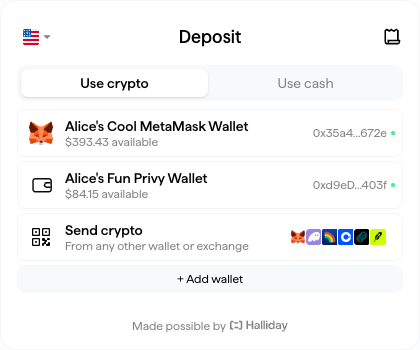
In the scenario that a developer chooses to show multiple possible funding sources for the user, an array of funder objects can be passed as `deposit.funders` to the `HallidayPayments` constructor (or later via `updateConfig` / `updateWallets`).
Funders can be any address that is expected to fund a payment. The SDK widget will take account of token balances at the time of a payment so the user can select a possible input token and amount.
**Naming Each Funder**
To differentiate funders in the UI, a name string can be supplied that will be shown to the user. Pass `walletName` as a member of each funder object.
```tsx copy theme={null}
// First, create connections to multiple funding source wallets, like shown earlier
owner.walletName = "Alice's Cool MetaMask Wallet";
privyWallet.walletName = "Alice's Fun Privy Wallet";
updateWallets({
owner,
deposit: {
funders: [
owner, // User's MetaMask or the like
privyWallet, // Embedded wallet that the user is signed into with a balance
// More funders can go here
]
}
});
```
```tsx copy theme={null}
// First, create connections to multiple funding source wallets, like shown earlier
owner.walletName = "Alice's Cool MetaMask Wallet";
privyWallet.walletName = "Alice's Fun Privy Wallet";
const halliday = new HallidayPayments({
apiKey: HALLIDAY_PUBLIC_API_KEY,
owner,
deposit: {
funders: [
owner, // User's MetaMask or the like
privyWallet, // Embedded wallet that the user is signed into with a balance
// More funders can go here
]
}
});
```
### Embedding the SDK Widget
By default, the Payments Widget opens as a modal overlaying the web page.
Another option is to embed it within a page. In React, render the `` component where the widget should appear. In JavaScript, provide the `targetElementId` option.
```tsx copy theme={null}
import { HallidayPaymentsProvider, HallidayEmbed } from "@halliday-sdk/payments/react";
```
```tsx copy theme={null}
import HallidayPayments from "@halliday-sdk/payments";
const halliday = new HallidayPayments({
apiKey: HALLIDAY_PUBLIC_API_KEY,
// Embed the widget inside an HTML element by id
targetElementId: "element-id",
deposit: {
outputs: ["base:0x833589fcd6edb6e08f4c7c32d4f71b54bda02913"],
},
});
```
### Customizing styles
Halliday supports setting custom styles on the Payments Widget in order to match an application's existing user interface.
```tsx copy theme={null}
const customStyles = {
primaryColor: "#66ff66", // Button (labeled in diagram below)
backgroundColor: "#FFFFFF", // Background
borderColor: "rgba(255, 255, 255, 1)", // #FFFFFF Border
textColor: "#ff0000", // Text
textSecondaryColor: "rgb(204, 51, 255)", // #CC33ff "Secondary text"
accentColor: "#33cccc", // Accent
componentShadow: "2px 5px #e6e6e6",
borderStyle: "SQUARE", // or undefined for default
backgroundStyle: "OFF", // or BLUR (uppercase only)
successColor: "#ff6600",
alertColor: "#ffff00",
zIndex: 1000, // number only
};
```
```tsx copy theme={null}
import HallidayPayments from "@halliday-sdk/payments";
const halliday = new HallidayPayments({
apiKey: HALLIDAY_PUBLIC_API_KEY,
owner,
deposit: {
outputs: ["base:0x833589fcd6edb6e08f4c7c32d4f71b54bda02913"],
},
customStyles: {
primaryColor: "#66ff66", // Button (labeled in diagram below)
backgroundColor: "#FFFFFF", // Background
borderColor: "rgba(255, 255, 255, 1)", // #FFFFFF Border
textColor: "#ff0000", // Text
textSecondaryColor: "rgb(204, 51, 255)", // #CC33ff "Secondary text"
accentColor: "#33cccc", // Accent
componentShadow: "2px 5px #e6e6e6",
borderStyle: "SQUARE", // or undefined for default
backgroundStyle: "OFF", // or BLUR (uppercase only)
successColor: "#ff6600",
alertColor: "#ffff00",
zIndex: 1000, // number only
},
fontName: "haffer", // or "inter", "eb-garamond", "roboto-mono"
headerTitle: "Checkout",
// ...
});
```
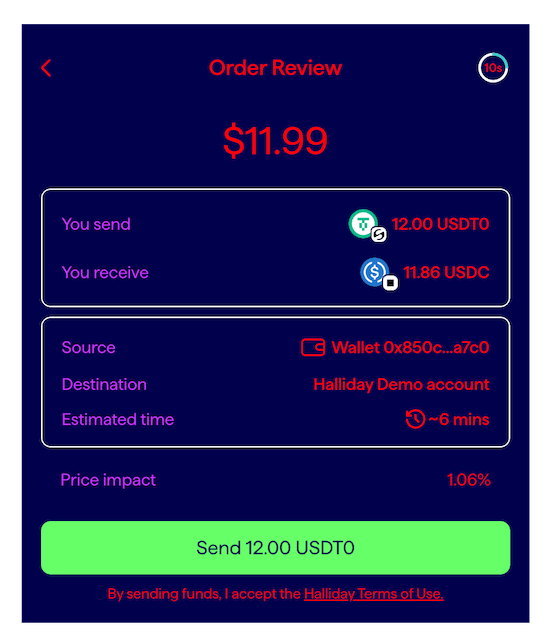
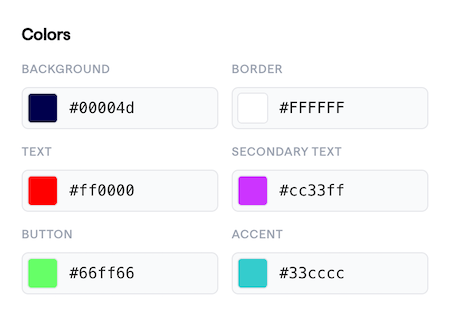
The following diagram shows how these values are used:
Colors in the above code and diagram:
For further customization, please [contact the Halliday team](mailto:partnerships@halliday.xyz).
Building a completely custom user interface is possible by implementing the [Halliday API](/pages/halliday-api-docs), instead of the Halliday JS SDK.